Hey guys, Tom here. Let’s cut to the chase—if you’ve been blowing up my phone asking about fish finders and GPS, you know I don’t mess around with fancy tech jargon or generic advice. I’ve spent 35 years chasing fish across North America—from the weedy bays of Lake of the Woods to the deep structure of Green Bay—and I’ve learned one thing: fishing electronics aren’t just “toys” for rich guys. They’re tools—tools that separate the guys who catch fish consistently from the ones who spend all day staring at a empty line. I’ve made every mistake you can make with this gear: bought cheap units that died mid-trip, misread sonar and cast to a school of weeds instead of walleye, and even lost my way back to the launch because I didn’t know how to use my GPS. This guide isn’t from some tech manual—it’s the hard-earned wisdom of a guy who’s been there, cursed at a fuzzy fish finder screen, and celebrated more catches because I finally figured out how to unlock these tools. I’m breaking down everything you need to know: how fish finders work, how GPS saves your butt, which units are worth your money, and the secrets only a veteran angler knows. No fluff, no lies—just straight talk to help you use fishing electronics like a pro. Let’s dive in.
First: Stop Wasting Money – Understand What You Actually Need
Before we talk about how these tools work, let’s get one thing straight: you don’t need the most expensive fish finder or GPS on the market to catch more fish. I see guys drop $2,000 on a fancy unit with 100 features they’ll never use, then struggle to find a school of perch. I’ve used everything from a $100 portable fish finder to a $3,000 combo unit, and let me tell you—more features don’t equal more fish. The key is understanding what you need based on where you fish and what you target. I made the mistake of buying a high-end deep-water fish finder for my small local lake—wasted money. Then I bought a cheap portable unit for Lake of the Woods—couldn’t read the deep structure, and I missed out on a school of walleye. Lesson learned: match your electronics to your fishing style. Let’s start with the basics—what fish finders and GPS actually do, and why they matter.
Fish Finders 101: How They Work (And Why Most Guys Misuse Them)
A fish finder isn’t magic—it’s sonar technology, plain and simple. It sends sound waves down through the water, which bounce off objects (fish, weeds, rocks, the bottom) and come back to the unit. The screen then translates those sound waves into images you can read. But here’s the thing: most guys buy a fish finder, turn it on, and have no clue what they’re looking at. I was one of those guys—for years. I’d see a blob on the screen and cast like a maniac, only to pull up weeds or a small minnow. It took me 5 years to really understand how to read sonar, and once I did, my catch rate doubled. Let’s break it down like I do for my buddies who are just starting out.
The Basics of Sonar: 2D, Side Imaging, Down Imaging – What’s the Difference?
There are three main types of sonar you’ll see on fish finders, and each has a purpose. I’ve used all three, and I’ll tell you exactly when to use each one—no guesswork.
- 2D Sonar (Traditional Sonar): The Workhorse – This is the most basic, most reliable sonar, and it’s what I use 80% of the time. It sends a narrow beam of sound straight down, giving you a vertical view of the water column. It shows you the bottom depth, structure (weeds, rocks, drop-offs), and fish as arches or blobs on the screen. I love 2D sonar because it’s simple—no fancy settings, just straight-up data. I use it for walleye, pike, and perch in lakes and rivers. Pro tip: Adjust the “gain” setting to filter out noise. I once had the gain too high and thought I had a school of fish—turns out, it was just tiny bubbles from my boat motor. Turn the gain down, and the screen clears up. Also, make sure your transducer is installed correctly—this is the #1 mistake I see anglers make. A poorly installed transducer will give you fuzzy images, interference, and even power issues. I prefer to wire my sonar directly to the battery with an inline fuse, bypassing switch panels that can cause interference, and I always use a poly mounting board so I can adjust the transducer’s position if needed. If you’re seeing a “rooster tail” or weird lines on the screen, your transducer is too low or tilted wrong—fix that, and your images will sharpen right up.
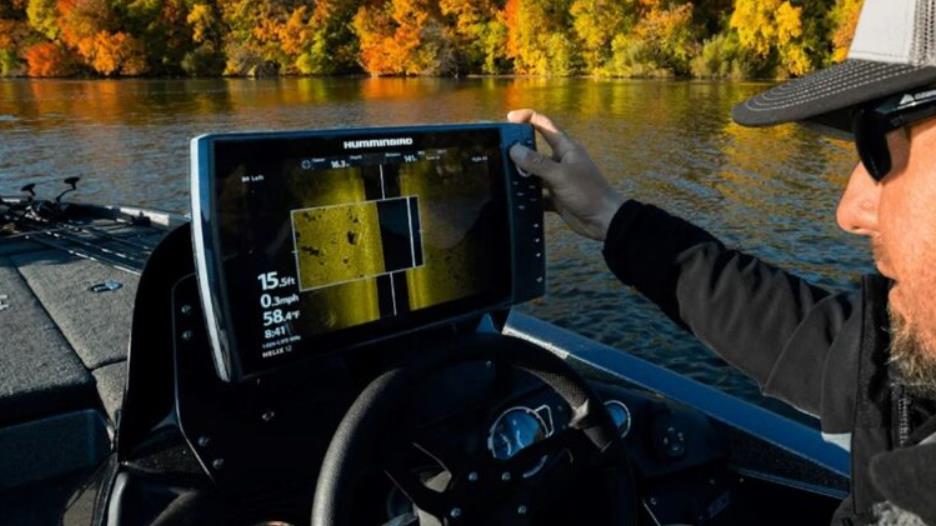
- Side Imaging (SI): Find Fish Hiding in Cover – Side imaging sends sound waves out to the sides of your boat (up to 200 feet per side), giving you a horizontal view of the water. It’s perfect for finding fish hiding in weeds, around rocks, or along drop-offs—areas where 2D sonar can’t reach. I use side imaging when I’m fishing new lakes or looking for structure I can’t see from the surface. One year, I was fishing Mille Lacs Lake and used side imaging to find a sunken tree in 15 feet of water—pulled out 3 big pike from that tree in 30 minutes. Pro tip: Side imaging works best when you’re moving slow (2–3 mph). If you go too fast, the images get blurry. I once zipped across the lake at 10 mph and thought I saw a school of walleye—turns out, it was a patch of weeds. Slow down, and let the sonar do its work. Also, side imaging is great for ice fishing too—pair it with a portable unit, and you can scan the area around your hole to find schools of perch or walleye without drilling a dozen holes.
- Down Imaging (DI): See Structure in Detail – Down imaging is like 2D sonar on steroids—it sends a wider, more detailed beam straight down, giving you a high-definition view of the bottom and structure. It’s perfect for identifying small details: a pile of rocks, a bed of weeds, or even individual fish. I use down imaging when I’m targeting trophy walleye or lake trout—fish that hang out in specific structure. I once used down imaging to find a small hump in 25 feet of water on Lake Simcoe—caught a 28-inch walleye off that hump 10 minutes later. Pro tip: Down imaging is great for deep water (20+ feet), but it’s not necessary for shallow water (less than 10 feet). Save the battery and stick to 2D sonar when you’re fishing shallow bays.
How to Read a Fish Finder (My Personal System)
Reading a fish finder isn’t rocket science, but it takes practice. I’ve developed a simple system over the years that works for any unit—here’s how I do it:
- Check the Depth First – The first thing I look at is the depth on the right side of the screen. Fish hang out at specific depths depending on the time of day and season. For example, walleye are in 15–25 feet of water in winter, but move to 5–10 feet in summer. Knowing the depth tells me where to drop my line.
- Look for Structure – Structure is where fish hide. On the screen, weeds look like a fuzzy green patch, rocks look like jagged lines, and drop-offs look like a sudden drop in the bottom line. I focus on the edges of structure—fish love to hang out there, waiting to ambush prey. I once spent an hour casting to the middle of a weed bed with no bites—switched to the edge, and caught 4 walleye in 10 minutes.
- Identify Fish Arches – When a fish swims through the sonar beam, it shows up as an arch on the screen. The size of the arch tells you the size of the fish: a small arch is a minnow or perch, a big arch is a walleye or pike. But here’s the trick: not all blobs are fish. Weeds, bubbles, and even trash can show up as blobs. To tell the difference, look for movement—fish arches will move up and down in the water column, while weeds stay in one place. I once wasted 30 minutes casting to a blob that turned out to be a plastic bag—lesson learned.
Pro tip: Use the “fish ID” feature sparingly. It’s tempting to turn it on and let the unit label fish for you, but it’s not always accurate. I once had fish ID turned on and thought I had a school of walleye—turns out, it was a school of minnows. Learn to read the arches, and you’ll be more accurate.
GPS for Anglers: It’s Not Just for Navigation (My Life-Saving Tips)
Most guys think GPS is just for getting back to the launch—but it’s so much more. A good GPS can save you time, help you find fish, and even save your life. I’ve been fishing in thick fog on Lake of the Woods, unable to see 10 feet in front of my boat, and used GPS to get back to shore safely. I’ve also used GPS to mark productive spots—so I can come back to them year after year. Let’s break down what GPS does, and how to use it like a pro.
What GPS Actually Does (And Why You Need It)
GPS (Global Positioning System) uses satellites to pinpoint your exact location on the water (down to a few feet). For anglers, this means three things: navigation, waypoints, and mapping. I use all three every time I fish, and I’d be lost without them (literally).
- Navigation: Get Where You Need to Go (And Back) – This is the most basic use of GPS, but it’s the most important. If you’re fishing a big lake or river, it’s easy to get disoriented—especially in fog, rain, or low light. I once fished Green Bay in a snowstorm, and if I didn’t have GPS, I would’ve gotten lost. Most GPS units let you set a “home” waypoint (your launch or dock), so you can press a button and get back safely. Pro tip: Always set your home waypoint before you leave the dock. I once forgot to set it, and spent 2 hours circling the lake trying to find the launch—my buddies still give me grief for that.
- Waypoints: Mark Your Honey Holes – This is where GPS becomes a game-changer. A waypoint is a saved location on your GPS—you can mark spots where you caught fish, found structure, or even a good bait shop. I have over 100 waypoints saved on my GPS—from a weedy bay on Mille Lacs Lake where I catch pike to a deep hump on Lake Simcoe where I find lake trout. Pro tip: Name your waypoints so you remember what’s there. I use names like “Pike Weeds – Mille Lacs” or “Walleye Hump – Simcoe” instead of generic numbers. That way, when I’m scrolling through waypoints, I know exactly where to go. Also, use your GPS to create custom maps with 1-foot contours—this lets you see depth changes and structure that aren’t on standard maps, which is a huge advantage over other anglers.
- Mapping: See the Lake Before You Cast – Most modern GPS units have built-in lake maps that show depth contours, shorelines, and even structure. This is perfect for fishing new lakes—you can look at the map and find drop-offs, humps, and weedy bays before you even launch your boat. I once fished a new lake in northern Michigan, used the GPS map to find a drop-off in 18 feet of water, and caught 5 walleye there in 2 hours. Pro tip: If your GPS doesn’t have a built-in map for your lake, you can download it online (most manufacturers offer free or paid maps). I downloaded a map for Great Slave Lake before my trip there, and it saved me hours of searching for structure.
Fish Finder + GPS Combos: Worth the Investment?
You can buy separate fish finders and GPS units, but I recommend a combo unit—they’re more convenient, easier to use, and save space on your boat. I’ve used both separate units and combos, and combos are hands down better. My current unit is a Humminbird Helix 9—combines 2D, side imaging, down imaging, and GPS in one unit. It’s easy to use, and the screen is big enough to read in bright sunlight. But here’s the thing: you don’t need to spend a fortune on a combo. I used a $500 Garmin combo for years, and it worked great for my needs. Pro tip: If you’re on a budget, look for combo units with 2D sonar and basic GPS—you can add side/down imaging later if you need it. And if you fish from a kayak or small boat, a castable sonar with GPS (like the Garmin STRIKER Cast) is a game-changer. Just cast it out, pair it with your phone, and you’ll get sonar and GPS data right on your screen—no need to mount a big unit. It has a 200-foot castable range, 10+ hours of battery life, and even lets you create custom maps with 1-foot contours. I keep one in my kayak, and it’s saved me hours of drilling empty holes when ice fishing too.
Tom’s Top Gear Picks (Based on 35 Years of Use)
I’ve tested dozens of fish finders and GPS units over the years, and these are the ones that have never let me down. I’m not sponsored by any brand—these are just the units I use and recommend to my buddies.
- Budget Pick (Under $300): Garmin Striker 4 – This is a basic 2D fish finder with built-in GPS. It’s perfect for beginners or guys who fish small lakes. I used this unit for 5 years, and it caught me more fish than I can count. It’s simple to use, has a clear screen, and the GPS is reliable. Pro tip: Add a portable transducer mount if you fish from different boats—no need to drill holes every time.
- Mid-Range Pick (Under $800): Humminbird Helix 7 – This combo unit has 2D, side imaging, down imaging, and GPS. It’s perfect for most anglers—whether you fish lakes or rivers. I upgraded to this unit 3 years ago, and it’s been a game-changer. The side imaging lets me find structure I never would’ve seen with 2D sonar, and the GPS is accurate to within a few feet. It’s also compatible with ice fishing transducers, so I use it year-round.
- High-End Pick (Over $1,000): Lowrance HDS Live 12 – This is the unit I use now, and it’s worth every penny. It has 2D, side imaging, down imaging, and advanced GPS with built-in maps for almost every lake in North America. It also has “live sonar,” which lets you see fish moving in real time—no more guessing if that arch is a fish or a weed. I use this unit for deep-water fishing (like lake trout on Great Slave Lake) and it never disappoints. But be warned: it’s expensive, and it takes time to learn all the features. I spent a weekend playing with it before my first trip, and it was worth it.
- Castable Pick: Garmin STRIKER Cast GPS – If you fish from a kayak, canoe, or don’t want to mount a permanent unit, this is perfect. It’s small, lightweight, and casts up to 200 feet. Pair it with your phone, and you’ll get sonar and GPS data in real time. I use this when I’m ice fishing too—cast it out from my shanty, and I can scan the area for fish without drilling a dozen holes. It’s waterproof, has a 10-hour battery life, and is super easy to set up—just download the app, pair it, and go.
Tom’s Biggest Mistakes (So You Don’t Repeat Them)
I’ve messed up more times than I can count with fishing electronics—these are the mistakes that still haunt me, and the ones that taught me the most. Learn from my errors, and you’ll save yourself frustration, money, and missed catches:
- Mistake #1: Buying a Unit Too Advanced for My Needs – Early in my career, I bought a high-end unit with all the bells and whistles, but I didn’t know how to use half the features. I wasted money and struggled to catch fish. Now, I buy units that match my fishing style—no more overpaying for features I’ll never use. Don’t be that guy who buys a $2,000 unit and only uses the depth finder.
- Mistake #2: Not Calibrating the Fish Finder – I once fished Lake of the Woods for 3 hours with no bites, only to realize I forgot to calibrate my fish finder. The screen was showing false readings, and I was casting to empty water. Calibrate your unit before every trip—it takes 2 minutes, and it makes a huge difference. Also, check your transducer installation regularly—even a small shift can mess up your sonar. I once had my transducer come loose, and I spent an hour thinking there were no fish in the area—fixed the transducer, and caught a walleye 5 minutes later.
- Mistake #3: Ignoring GPS Waypoints – I used to think waypoints were a waste of time—until I forgot where I caught a 40-inch pike on Mille Lacs Lake. Now, I mark every productive spot, and I come back to them year after year. Waypoints are like a treasure map—they save you time and help you catch more fish. I also make sure to back up my waypoints—once I lost all my waypoints when my GPS died, and I was devastated. Now, I save them to my phone and a memory card.
- Mistake #4: Not Bringing a Backup Power Source – There’s nothing worse than your fish finder or GPS dying mid-trip. I once fished Green Bay in the middle of winter, and my GPS battery died. I had to use landmarks to get back to shore, and it was stressful. Now, I always bring a portable battery pack to charge my electronics. It’s small, cheap, and could save your life. This is especially important with castable units—make sure to charge them fully before your trip, and bring a backup charger if you’re fishing all day.
- Mistake #5: Relying Too Much on Electronics – Electronics are tools, not substitutes for experience. I’ve seen guys stare at their fish finder all day, never casting, because they’re waiting for a “perfect” arch. Sometimes, you just need to cast around and trust your instincts. I once caught a 30-inch walleye in an area where my fish finder showed nothing—turns out, the fish were hiding in a small patch of weeds that the sonar didn’t pick up. Use electronics to guide you, but don’t let them control you. Also, don’t forget to use your eyes and ears—birds diving, ripples on the surface, and even the wind can tell you where the fish are, too.
Final Thoughts – Electronics Are Tools, But You’re the Angler
Guys, fishing electronics are game-changers—but they’re only as good as the angler using them. I’ve seen beginners catch more fish with a $100 fish finder than pros with a $3,000 unit—because the beginner took the time to learn how to use it. The key is to start simple, practice, and learn from your mistakes. I’ve been using fish finders and GPS for 20 years, and I still learn something new every trip.
Remember: You don’t need the most expensive gear—you need gear that works for you. Take the time to learn how to read your fish finder, mark waypoints, and use your GPS, and you’ll catch more fish, have more fun, and avoid the mistakes I made. And if you’re ever unsure—ask. I’m always happy to share what I’ve learned, whether it’s how to calibrate your sonar, choose the right combo unit, or use a castable fish finder for ice fishing.
Now grab your rod, fire up your fish finder, and hit the water. The fish are out there—your electronics will help you find them. Tight lines, guys.
– Tom, Your Go-To Veteran for Fishing Electronics Wisdom